
Powered by Yellow Schedule
Get started quickly with guides tailored to your role
Triage referrals efficiently from any device
Upload and manage referrals with ease
Everything you need to start triaging referrals efficiently
Triage referrals securely from anywhere on your iOS or Android device (Phone or Tablet)
Coming Soon
Coming Soon
Coming Soon
Install Triage Link from the App Store (iOS) or Google Play (Android) on your mobile or tablet
Use the login credentials provided by your hospital administrator
See all referrals assigned to you in a clear, organised list
Review each referral, make your decision, and add notes for the admin team
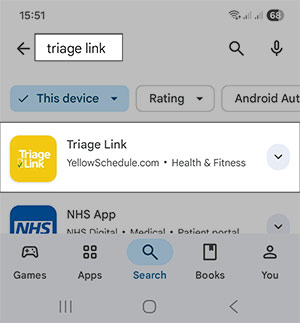
Within the iOS App Store or Android Play Store, search for "triage link" and simply tap to install the app on your phone or tablet.
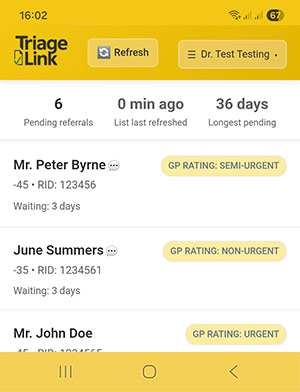
New referrals appear in your triage list. On opening a referral, review the full letter and assign the correct Clinical Prioritisation Category (CPC), along with any relevant notes for administrative scheduling.
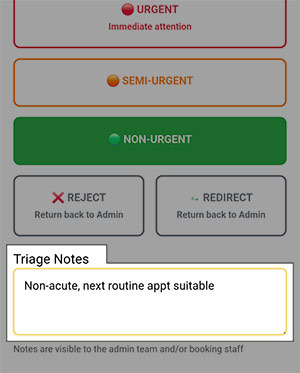
You can leave notes when triaging referrals to guide the admin and booking staff. Notes appear alongside triage decisions, helping your team understand any special requirements or patient considerations.
Contact your hospital administrator to reset your password. They can generate a new temporary password for you through the admin portal.
The mobile app requires an internet connection to sync referrals and save your triage decisions. However, you can view previously loaded referrals offline.
Triage Link uses industry-standard encryption and complies with healthcare data protection regulations. All data is transmitted securely and stored in compliance with GDPR and healthcare standards.
Yes, you can enable push notifications in the mobile app to be notified when new referrals are assigned to you.
Streamline referral processing and management
Coming Soon
Coming Soon
Coming Soon
Access the Triage Link admin portal using your credentials
Upload referrals from Healthlink, community providers, or any other source such as scanned handwritten referrals, or other images or PDF documents
Let the system suggest a consultant or manually assign based on specialty
Monitor triage progress and schedule appointments once triaged
Guide coming soon
Guide coming soon
Guide coming soon
Guide coming soon
Our support team is here to assist you
Available during business hours